
Information at Laurea is classified as public, internal, confidential or secret based on the kind of harm that unauthorized disclosure to outsiders could cause. The purpose of this guide is to help you classify the information you handle so that you can share and store it on platforms appropriate for that purpose.
Data classification
Public information
All Laurea’s activities are public unless specifically required by law to be kept confidential. It is not necessary to publish all public information, but you must be able to ensure that the information can be made available outside Laurea if necessary.
Public personal data
The personal data processed at Laurea may be public in nature, but its processing must always comply with personal data protection legislation.
Even the processing of public personal data must have a defined purpose and be properly protected.
For this reason, public personal data should not be stored, for example, in cloud services that store data without adequate protection, especially outside the scope of EU legislation.
Examples of public data
- Press releases and publications
- Minutes and decisions of Laurea’s Management Team and the Board of Directors.
- Presentation material that does not contain confidential information and whose publication has been authorised by the authors
- E-mail and telephone numbers of Laurea staff
Internal data
Information that is required by Laurea as a whole or by individual working groups may be handled internally. As a rule, this is information that can be made available outside Laurea, if necessary, on the basis of the Openness Act. Internal information can be processed and shared on platforms provided by Laurea and accessed using Laurea user IDs.
Internal personal data
Internal personal data is only used for a specific purpose. Therefore, it cannot be stored on public cloud services or websites where the use of the data cannot be monitored.
Examples of internal data
- Team memos
- Internal newsletters
- Teaching material for internal use
- Student records
Confidential data
Confidential information may be processed only by persons who have a legitimate need to know for the purposes of their duties and who are aware of the obligations relating to the processing of the information. Confidential information must be protected by technical measures to ensure encryption and access rights.
Confidential personal data
Misuse of confidential personal data can cause harm to a person. It must be protected from unauthorised processing, so confidential personal data must not be shared under any circumstances on cloud services or platforms that are not under Laurea’s control or user management.
Examples of confidential information
- Trade secrets
- Research plans
- Verbal assessment of individuals (e.g. assessment of behaviour or character traits)
- Information relating to the person’s salary
- Identification numbers
Confidential information means information that must not be shared with others without a valid reason.
If you handle confidential information, use only Laurea’s own services (such as OneDrive, Teams, or SharePoint).
Never store or share it in services that are not managed by Laurea (such as Dropbox, Google Drive, or your own private applications).
Confidential personal data can include, for example, someone’s salary information, personal identity number, or an evaluation of a person.
That is why it must be handled carefully and only in secure environments.
Secret data
Secret information is a particularly critical category of data that may be processed for security or criminal purposes, or may contain sensitive personal data. Disclosure of secret information may cause significant damage to Laurea or to the individual to whom the information relates.
Secret information may only be processed in specifically designated functions and systems, and even then preferably in encrypted form.
Secret personal data
Sensitive personal data is at the heart of privacy and may only be processed under the conditions set out in the Data Protection Act and only on platforms suitable for processing confidential data.
Examples of secret data
- Data relating to a person’s health
- Documents containing information about a person’s social welfare status
- Criminal records
- Concrete security plans
- Contact details flagged for security restrictions
Personal information – note for students
Personal information means material stored for your own private use (not related to work or studies).
Laurea’s rules allow you to store personal files, but they must be clearly kept separate from study‑ or work‑related data.
Tip:
Create separate folders for personal files and name them clearly so they are easy to distinguish from other material.
Storage and processing locations according to data classification
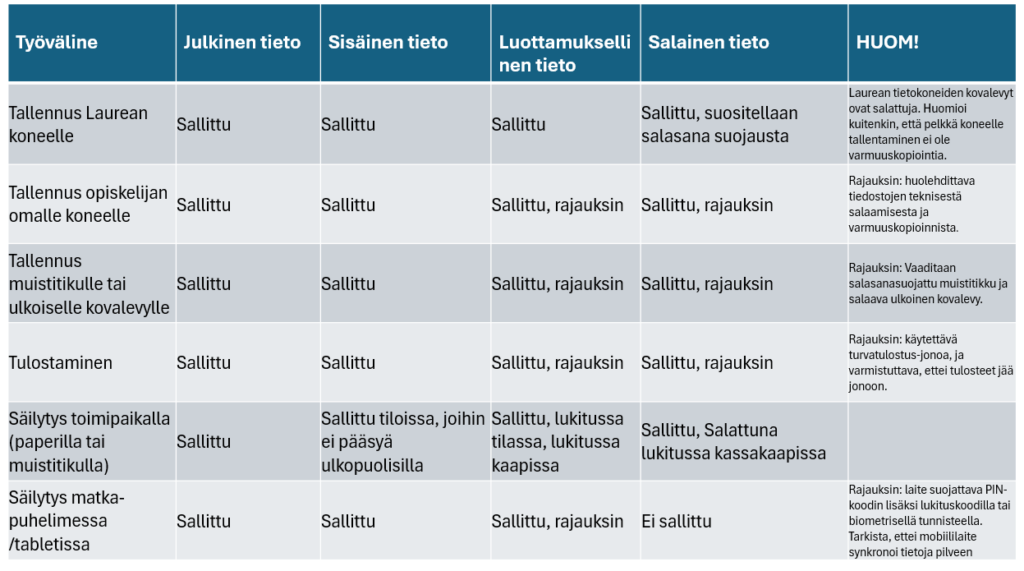
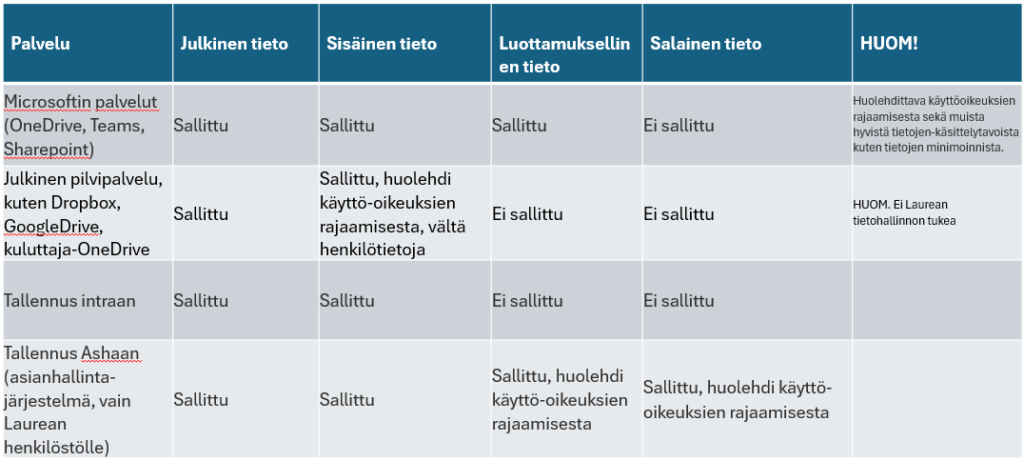
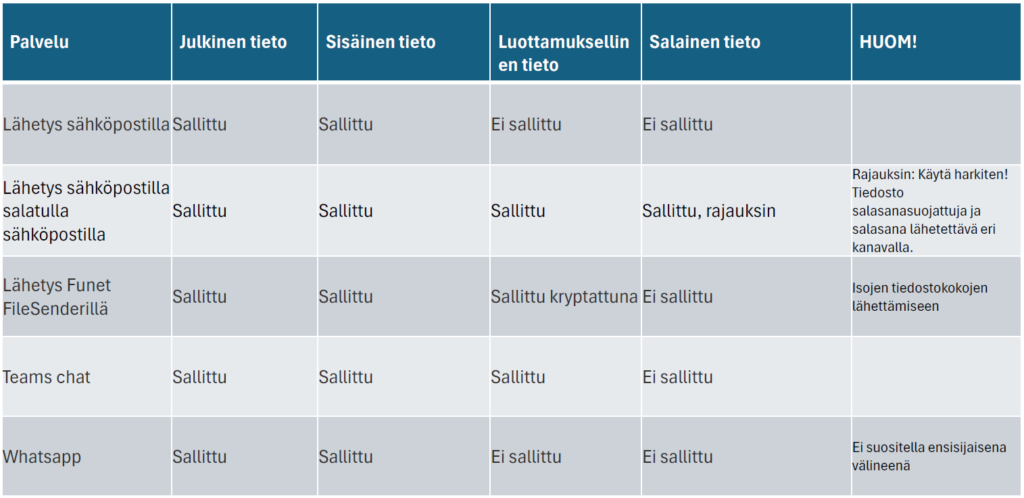
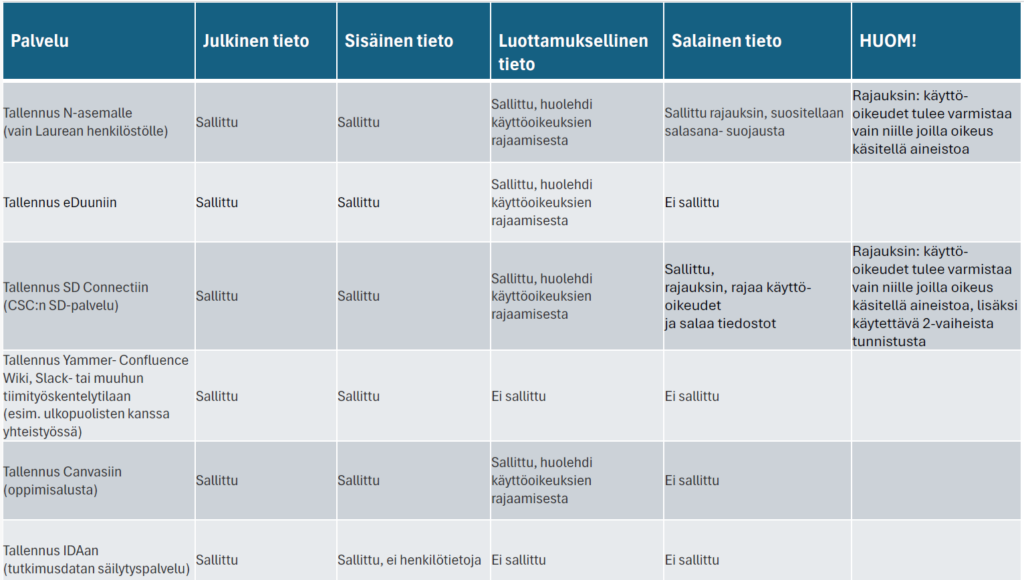
The handling locations according to Laurea’s data classification, are based on security and data protection requirements. These requirements have been thoroughly reviewed for each tool and platform offered by Laurea. The more sensitive the data, the higher the security arrangements required, including technical encryption of the data or its geographical location.
Saving on physical devices
Saving and sharing material on cloud service
Sharing via email or instant messaging
Sharing on common network drives or other storage services
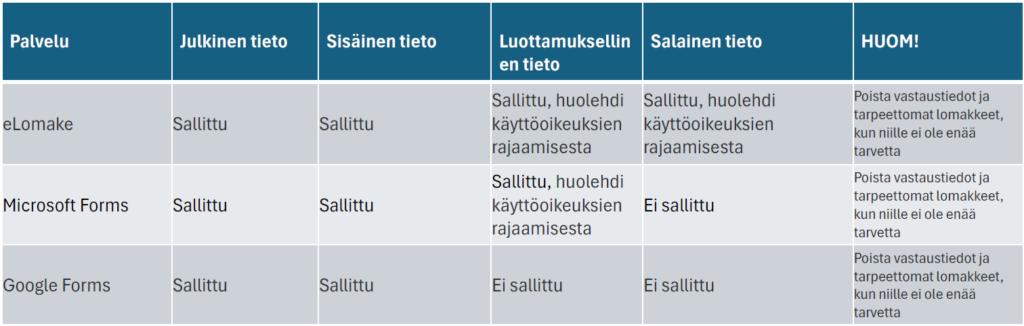
Questionnaires
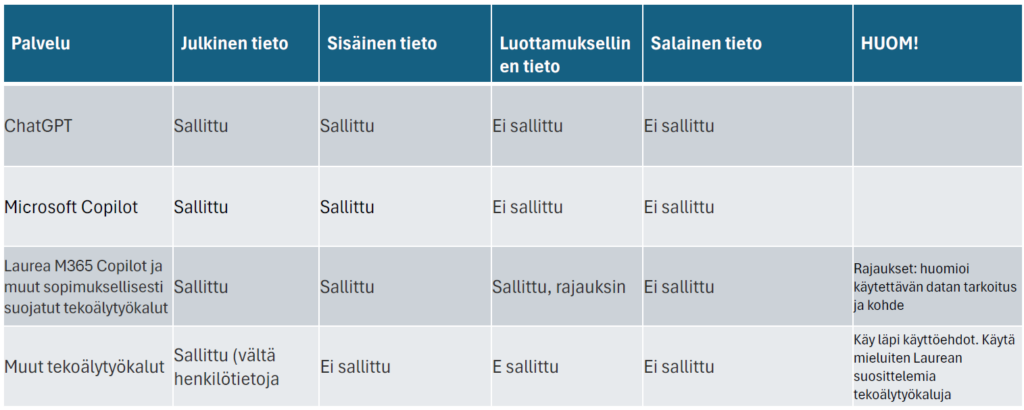
AI tools
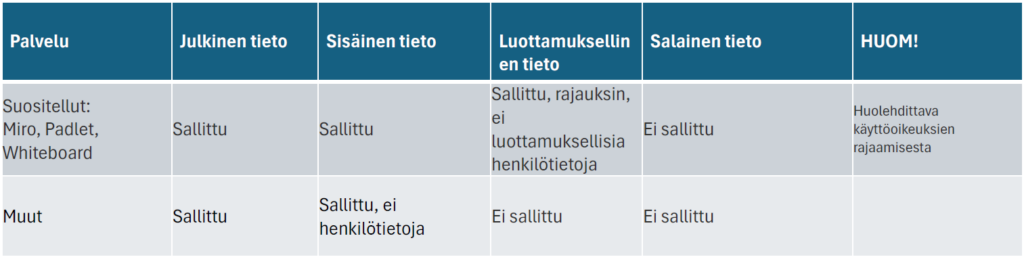
Sharing and working with co-development tools
File sharing
Please store and share files in accordance with Laurea’s data classification guidelines (add link).
OneDrive
OneDrive for Business is the place where you can store and share your files. You can update and share files from anywhere and work on Office documents simultaneously with others.
OneDrive for Business is a Laurea‑supported and recommended tool and can be found in the Office 365 tool menu, accessible from the top left corner of the link.
FileSender – an easy way to send large files
FileSender is a service that allows you to send very large files (even several gigabytes) without filling up the recipient’s email inbox.
You log in using HAKA authentication, which means that as a Laurea student you can use your existing Laurea credentials – no separate account is needed.
When should you use FileSender?
Use FileSender when a file is too large to be sent by email, for example:
- videos
- audio files
- a thesis with many images
- other large files or files that require specialized software
How does FileSender work?
- Upload the file to FileSender (on a FUNET server).
- Add the recipients’ email addresses.
- The service sends them a notification with a download link.
- Set an expiration date, after which the file is automatically removed from the service.
Remember!
- Keep a backup of files stored in FileSender elsewhere so that important material is not lost if the service is temporarily unavailable.
You can log in to FileSender at: https://filesender.funet.fi/
A guide video and short introduction are available at: https://research.csc.fi/service/funet-filesender-file-sharing-service/
Google – what students should know
Google Docs is Google’s free office productivity suite that allows you to create documents, spreadsheets, and presentations directly in a web browser. The service requires a Google account, and documents can be accessed on any device with an internet connection and a browser.
You can:
- create new files or upload your own documents
- share files with others and work on them together
- edit the same document with multiple people at the same time
- communicate in real time with other contributors
- benefit from automatic saving, so your work is not lost
However, remember to save important files on your own device as a backup.
Information security notice!
Google’s terms of service grant Google extensive rights to stored content.
For this reason, Google Docs is not recommended for processing personal data or confidential information.
You can read the terms of service at: http://www.google.com/accounts/TOS
Learn more about Google Docs at: https://docs.google.com/
Laurea does not provide support for the use of Google tools.
Photography and publishing images
Remember that taking photos and publishing photos are two different things.
As a general rule, you may not share or publish photos or videos you have taken on social media, websites, publications, or video‑sharing platforms without the consent of the person(s) shown in the image.
Photography and social media posts
Taking photos in public places is generally allowed. For example, you may share event photos on social media. If you take photos of an individual person, always ask for their permission before publishing the image.
At events, it is important to consider people who do not want to be photographed. This can be communicated, for example, with signs or by informing participants at the beginning of the event.
Use of images in communication, marketing, or projects
If photos or videos are used for communication, marketing, or project work, the people being photographed or recorded must always be informed:
- what the images or videos will be used for
- that giving consent is voluntary
If needed, Laurea’s media consent form can be used. Refusing consent must not cause any disadvantage.
Information security and storage
Check where your phone’s photos are stored and backed up (e.g. Google Photos, iCloud). Make sure you only publish or share images securely and delete unnecessary photos when needed.
Copyright
If you publish photos taken by someone else, make sure you respect copyright.
- Ask for permission when needed
- always credit the photographer
Photography in teaching
Taking photos as part of learning assignments can be pedagogically justified.
In these cases, photos are used for internal purposes only, and separate consent is usually not required – however, people must always be informed that photography is taking place.
Quick photography guidelines for students
- Taking photos in public places is generally allowed, but ask for permission if you are photographing an individual person.
- At events, be mindful of people who do not want to be photographed.
- If photos are used for communication, marketing, or projects, always explain the purpose and ask for consent.
- Check where photos are stored (e.g. Google Photos or iCloud) and delete unnecessary images when needed.
- Do not publish photos of others without permission, and remember to credit the photographer.Photography is allowed in learning assignments, but always inform participants that photos are being taken.
What is personal data?
Understand when you are processing personal data
You are handling personal data whenever a person can be identified, either directly or indirectly.
- Direct identifiers are things like a person’s name or personal identity number.
- Indirect information (such as age, place of residence, or job title) can also identify someone when combined with other details.
If you work on a project, research, or development task where a person can be identified at any point, you are processing personal data.
In these situations, you must follow the EU data protection regulation (GDPR) and always handle personal data carefully and responsibly.
Protect special categories of personal data
According to the EU General Data Protection Regulation (GDPR), special (sensitive) personal data refers to information whose processing could cause harm to an individual. Because of this, processing such data is generally prohibited, and it must not be collected for purposes such as theses or other student work without a specific and lawful reason.
Special categories of personal data include:
- racial or ethnic origin
- political opinionsreligious or philosophical beliefs
- trade union membership
- genetic and biometric data used for identification
- health‑related data
- sexual orientation or sexual behaviour
When are students allowed to process special categories of personal data?
As a student, you may process special categories of personal data only in exceptional cases, for example:
- with a person’s clear and explicit consent, or
- in research carried out in the public interest, where processing such data is strictly necessary.
How to act if you process sensitive personal data
If your research, project, or assignment requires you to process sensitive personal data, the data must be protected with special care. In practice, this means that:
- The processing of the data must be traceable afterwards (who has stored, modified, or transferred the data)
- Everyone handling the data must have sufficient competence in data protection
- A data protection officer must be known and available for advice when needed
- Clear agreements must be in place between the data controller and any data processors to prevent unauthorized access
- The data must be encrypted and, where necessary, pseudonymised so that individuals cannot be easily identified
- The systems used must be secure and reliable (confidentiality, integrity, availability, and resilience)
- Data security measures must be regularly assessed and tested
Before you begin processing sensitive personal data, you must also assess and document:
- whether processing the data is truly necessary
- what risks are involved
- and how those risks can be minimized
Anonymisation and pseudonymisation of data
Anonymisation means processing personal data in such a way that no individual can be identified anymore.
This may involve generalising the data or turning it into statistical form. Simply removing a name or personal identity number is not enough if a person can still be identified by combining other pieces of information. If you plan to share the data further, it must be anonymised.
Pseudonymisation means replacing personal data with, for example, codes or aliases.
However, a person can still be identified if a separate key exists that links the code to the individual. For this reason, pseudonymised data is still considered personal data.