
With the eRPL feature in Pakki you can apply for recognition of prior learning for studies completed previously or elsewhere. On this page you will find written and video instructions for making an eRPL application.
With the eRPL tool you can apply for
- recognition of prior learning (an official certificate or transcript is required as an attachment)
- only for higher education level studies
- only for complete study units
- for the thesis of a Bachelor’s degree
- for conscript training
- Exemption from the mandatory language studies of a Bachelor’s degree (an official certificate from comprehensive school, upper secondary school or vocational qualification, a statement of dyslexia or a supporting statement from a language teacher is required as an attachment)
Select the type of eRPL application
- Substitution, when you want to substitute core competence studies in your curriculum.
- Inclusion, when you want to include studies in the complementary competence of your degree.
- Exemption, when you apply for exemption from the mandatory language studies of a Bachelor’s degree.
Making the application
Before making an eRPL application, have a PSP discussion with your tutor teacher. After that you can create the eRPL application in Pakki.
Creating the application
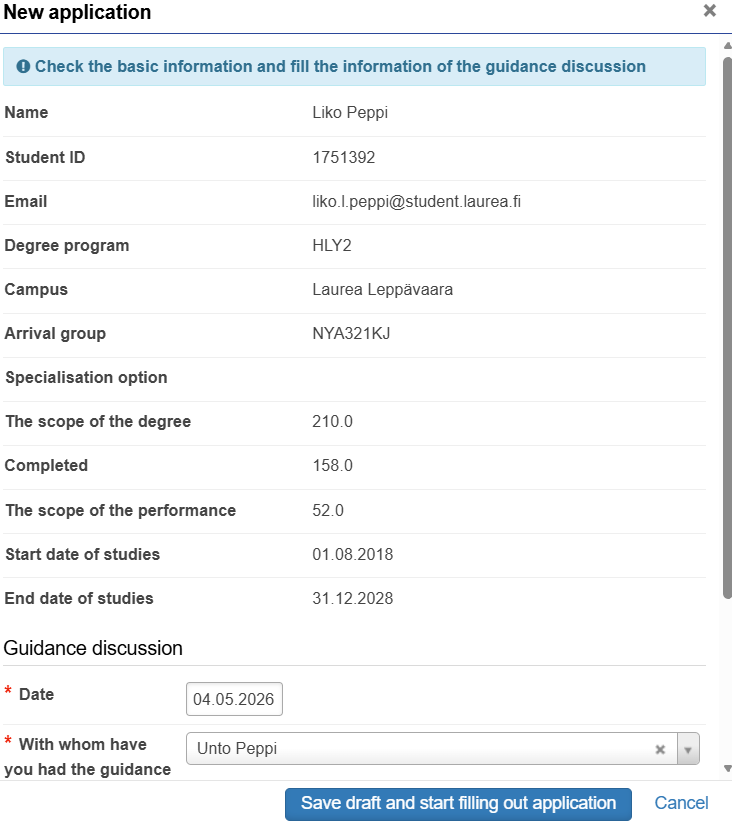
Choose eRPL from the top menu of Pakki. Press “New application” and check that the basic information is correct. Fill in the information about the guidance discussion and press “Save”. After this a draft application is created, where you add details about the place of completion and the studies completed.
Adding the place of performance
If you apply for substitution or inclusion of a study, add the information about the place of performance. If you only apply for exemption from a mandatory language study, you do not need to add the place of performance. If you have multiple places to record, add each to the application one at a time. If you cannot find the organization on the dropdown menu, contact the handler of the application (the Head of Student Affairs for Bachelor’s degree students or the responsible teacher of your Master’s degree programme).
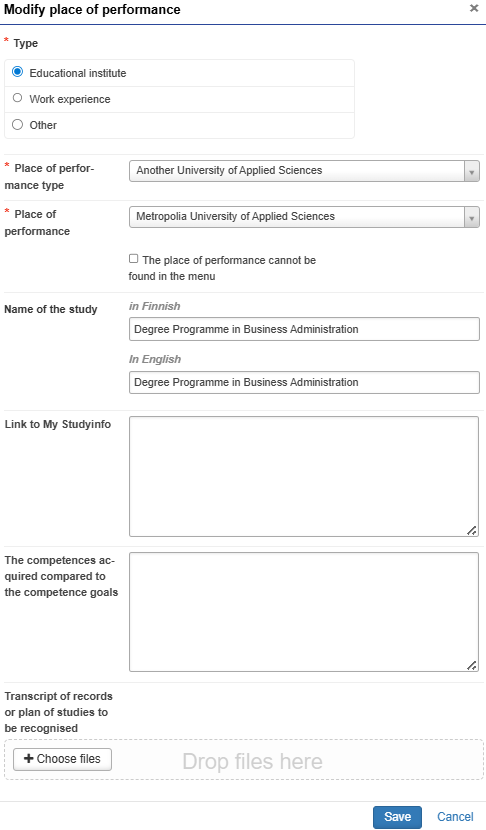
- Click “Add place of performance” and select Educational institution as the type.
- Select a suitable option for the Place of performance type, e.g. Another University of Applied Sciences, and select e.g. Metropolia University of Applied Sciences in the place of performance field.
- In the Name of the study field you can write for example Degree Programme in Business Management.
- If you apply for substitution, attach a link to the curriculum of your previous study performance in the “The competences acquired compared to the competence goals” field.
- Add an official transcript as an attachment. Screenshots or unclear attachments are not accepted. The attachment is mandatory and the application cannot be submitted without it.
Substitution
You can apply for substitution for core competence studies.
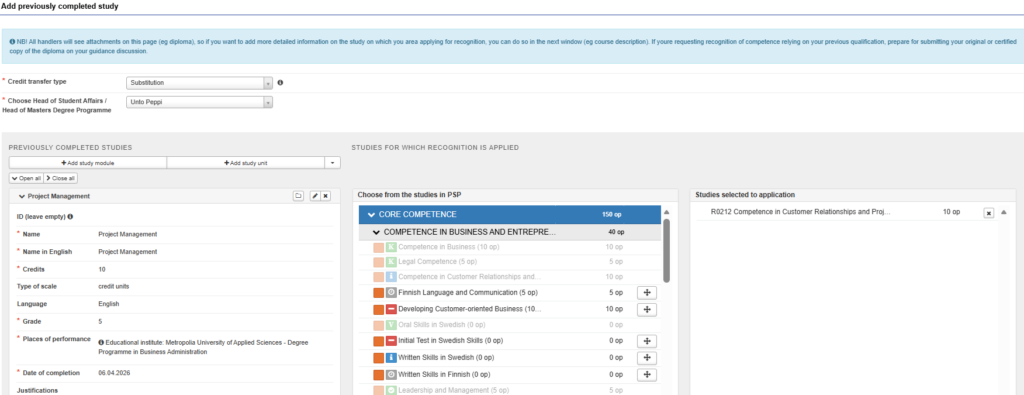
- Select “Add previously completed study”. Choose Substitution as the credit transfer type and select the handler of the application depending on your degree programme: Head of Student Affairs (Bachelor’s degree students) or the responsible teacher of your degree programme (Master’s degree students).
- Select “Add study unit” and fill in the details of the study you have completed.
- Leave the ID field empty.
- Enter the name of the study both in Finnish and in English. If the study you have completed is in English, enter the name in English in both fields.
- Add the credits of the study, type of scale, language of instruction, grade, place of performance and date of completion. Finally press Add.
- Select the study to be replaced from the PSP structure by clicking the core competence study you want to substitute.
- The study will move to the “Studies selected to application” section.
- Finally save.
- Add each study for which you are applying for substitution in the same way.
Inclusion
You can apply for inclusion to complementary competence studies.
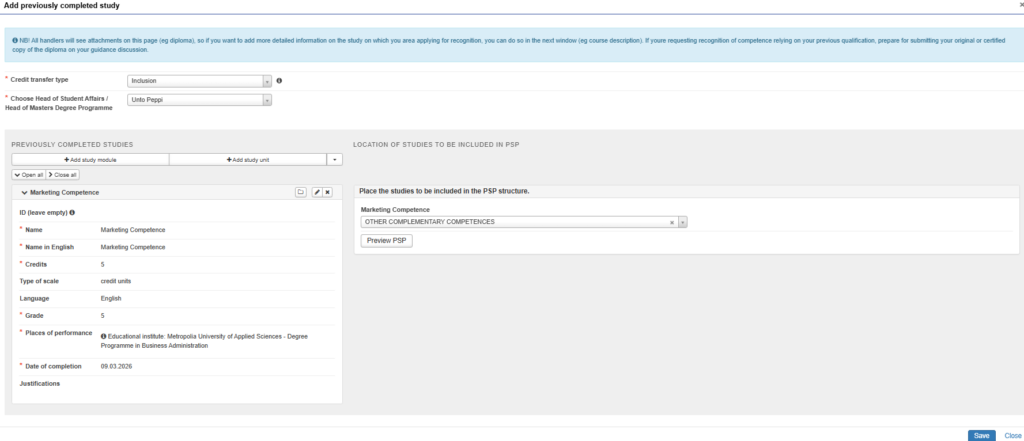
- Select “Add previously completed study”. Choose Inclusion as the credit transfer type and select the handler of the application depending on your degree programme: Head of Student Affairs (Bachelor’s degree students) or the responsible teacher of your degree programme (Master’s degree students).
- Select “Add study unit” and fill in the details of the study you have completed.
- Leave the ID field empty.
- Enter the name of the study both in Finnish and in English. If the study you have completed is in English, enter the name in English in both fields.
- Add the credits of the study, type of scale, language of instruction, grade, place of performance and date of completion. Finally press Add.
- Place the study to be included under an appropriate study module in the PSP structure.
- Finally save.
- Add each study for which you are applying for inclusion in the same way.
Exemption
You can apply for exemption from the mandatory language studies included in Bachelor’s degree programmes. Master’s degree students cannot apply for exemption as there are no mandatory language studies in Master’s degree programmes.
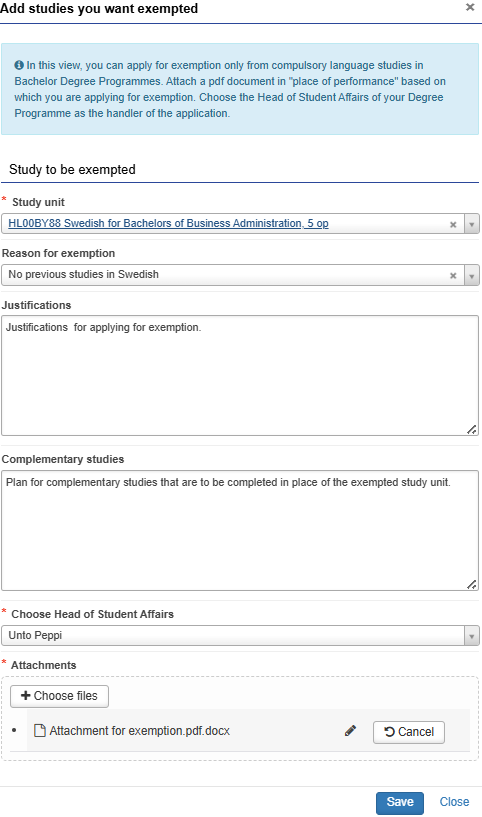
- Select “Apply for exemption”.
- From the Study unit menu, select the mandatory language study from which you are applying for exemption. Select the reason for the exemption.
- Provide the justifications for applying for exemption. You can write in the Complementary studies section a plan of the studies you intend to take instead of the exempted language.
- Choose the Head of Student Affairs of your Bachelor’s Degree Programme as the handler of the application.
- Add an attachment based on which you are applying for exemption:
- A free-form statement explaining on what grounds you apply for exemption. If you apply for exemption from Swedish, also state that you are aware that the absence of Swedish from the degree certificate may be an obstacle to employment. Do not record your health information.
- An official certificate from comprehensive school, upper secondary school or vocational qualification, or a certificate of dyslexia or a supporting statement from a language teacher.
- Finally save.
Submitting the application
When you have added the details of all the studies for which you are applying for inclusion, substitution or exemption to the application, send your application for processing to either the Head of Student Affairs (for Bachelor’s degree students) or the responsible teacher of the programme (for Master’s degree students) by clicking “Submit application”. If the application does not move forward, check carefully that you have filled in all the required information on the application and added the necessary attachments. Once you have submitted the application for processing, you can no longer edit it, but you can track the status of the application via the eRPL menu. If the handler returns the application to you for editing, you will be able to modify it again.

Video instructions
Through the links below you will find video instructions for making an eRPL application.
Substitution (YouTube)
Inclusion (YouTube)
Exemption (YouTube)