
On this page
Data classification
Storage and processing locations by data classification
File sharing
Photography and publishing images
What is personal data?
Are you looking for these?
Information at Laurea is classified as public, internal, confidential or secret based on the type of harm that unauthorized disclosure to an outside party could cause. The purpose of this guidance is to help you classify the information you handle so you can share and store it on platforms appropriate for that purpose.
Data classification
Public information
Laurea’s activities are, as a rule, public and only in parts specifically defined by law are kept secret. Not all public information needs to be published, but it must be possible to provide the information to parties outside Laurea if necessary.
Public personal data
Personal data processed at Laurea can be public in nature, but their processing must always take into account personal data legislation. Public personal data must also have a purpose for processing, and their processing must be secured. Therefore, even public personal data should not be stored, for example, in cloud services that store data insecurely especially outside the EU legal framework.
Examples of public information
- Announcements and publications
- Minutes and decisions of the Board and executive management
- Presentation materials that do not contain confidential information and for which permission to publish has been obtained from the authors
- Laurea staff email and phone number
Internal information
Information that is needed across Laurea or within specific workgroups can be handled internally. It is generally information that can, if necessary, also be made available to parties outside Laurea under the Freedom of Information Act. Internal information can be processed and shared on Laurea-provided platforms that are accessed using Laurea user credentials.
Internal personal data
Internal personal data is used only for a specific purpose. For that reason, it should not be stored in public cloud services or on websites where the use of the data cannot be monitored.
Examples of internal information
- Team minutes
- Internal announcements
- Teaching material intended for internal use
- Students’ study attainment records
Confidential information
Confidential information
Confidential information may only be handled by persons who need it for their duties and who know how to handle the information correctly. Such information must always be protected, for example by encryption and by appropriate access rights.
Confidential personal data
Confidential personal data are those data whose misuse could cause harm to a person. Therefore, these data must not be shared in services or cloud services that are not under Laurea’s administration or do not belong to Laurea’s user management.
Examples of confidential information
- National identification numbers
- Trade secrets
- Research plans
- Written assessments concerning individuals (e.g., assessment of behaviour or personality traits)
- Information related to a person’s salary
Confidential information = information that must not be shared with others without good reason.
If you process such information, use only Laurea’s own services (such as OneDrive, Teams, SharePoint). Never store or share it in services that Laurea does not control (such as Dropbox, Google Drive, or your own private applications).
Confidential personal data can be, for example, a person’s salary information, national identification number, or an assessment concerning a person. Therefore it must be handled carefully and only in secure environments.
Secret information
Secret information is the most sensitive type of information. It can include, for example, security-related plans, criminal matters, or highly personal health information. If such information falls into the wrong hands, it can cause serious harm both to Laurea and to an individual.
Therefore, secret information may only be handled by specifically named persons, in special systems – and usually always encrypted.
Secret personal data
Secret personal data are the most private information, such as health or social care records. They may only be processed in situations permitted by law and only on secure platforms approved for handling secret information.
Examples of secret information
- Security plans
- Persons subject to a protection order
- Medical certificates
- Documents showing use of social or health services
Personal data – note for students
Personal data means material stored for one’s own private use (not related to work or study). Laurea’s rules allow storage of personal files, but they must be clearly separated from materials related to study or work.
Tip:
Create separate folders for personal data and name them so that they are clearly distinguishable from other material.
Storage and processing locations by data classification
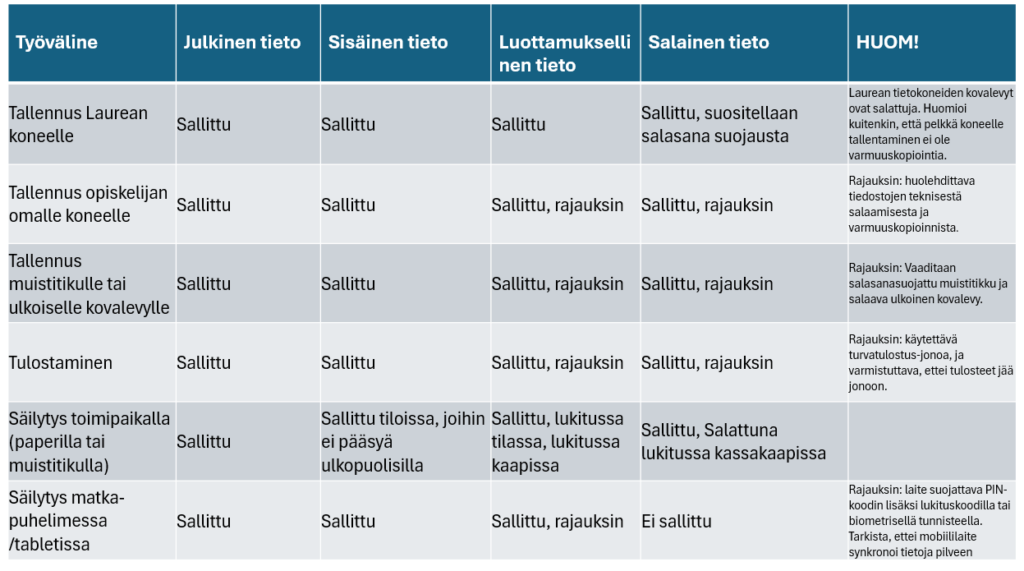
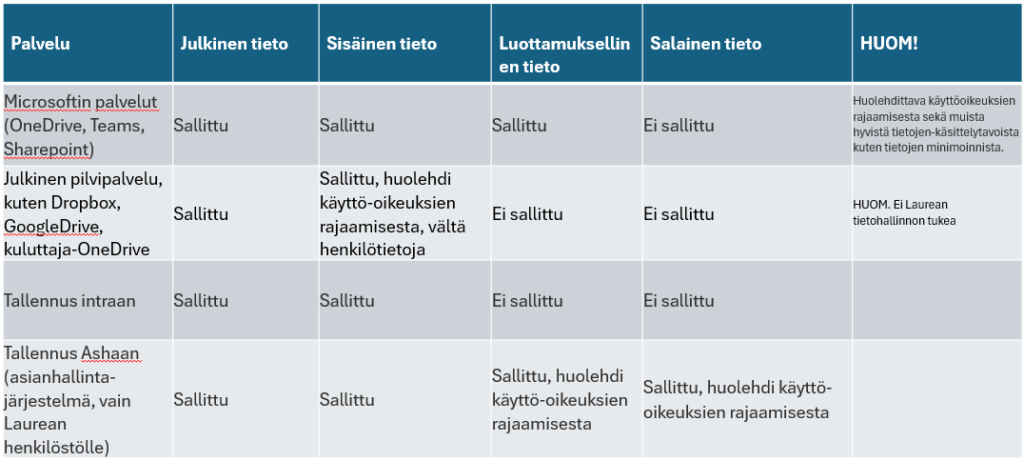
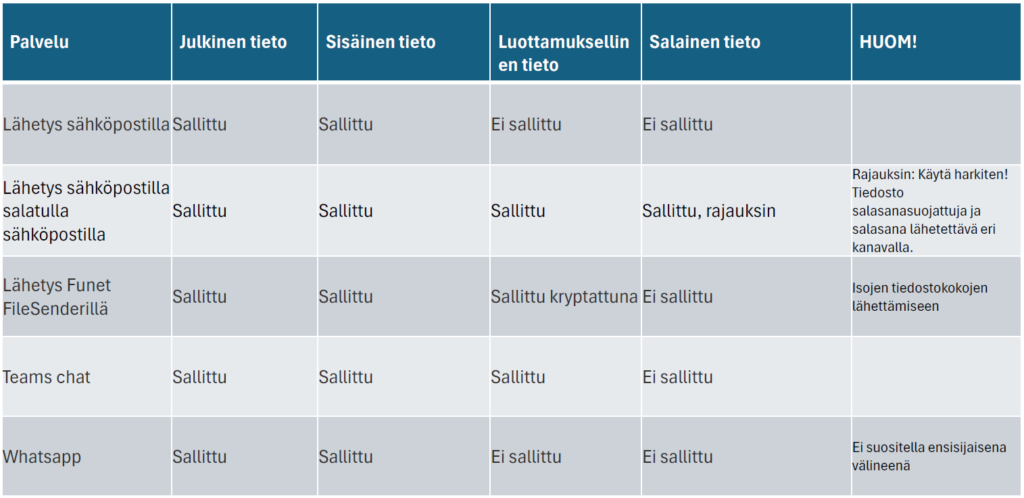
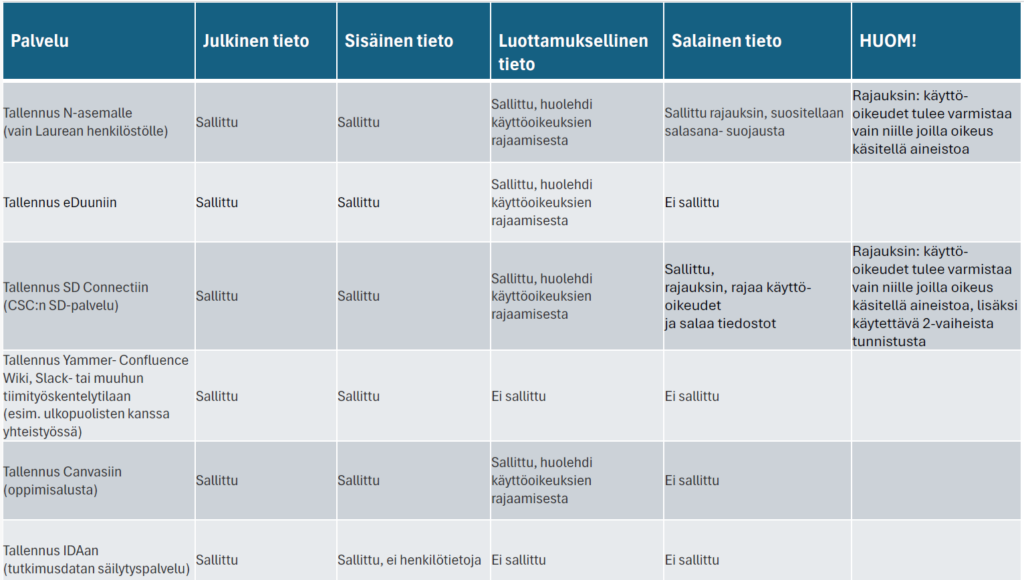
The processing locations according to Laurea’s data classification are based on requirements related to information security and data protection, which have been reviewed in detail for each tool and platform provided by Laurea. The more sensitive the information, the higher the security arrangements required, for example regarding technical encryption of the data or geographical location.
Storage on a physical device
Storage and sharing in cloud services
Sharing by email and instant messaging
Sharing on network drives and collaboration platforms
Conducting surveys and mappings
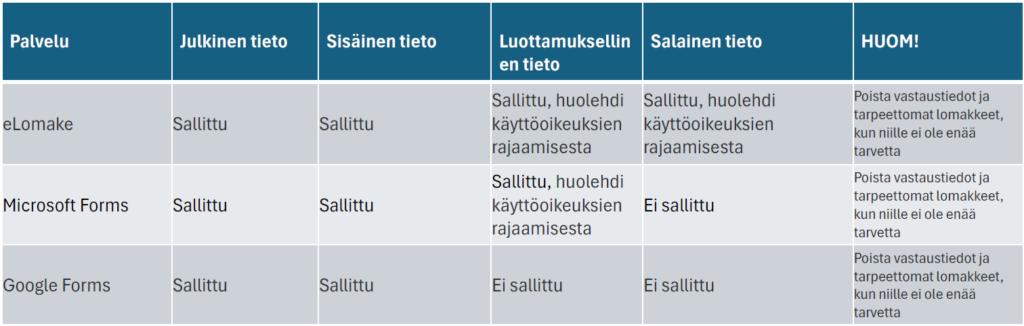
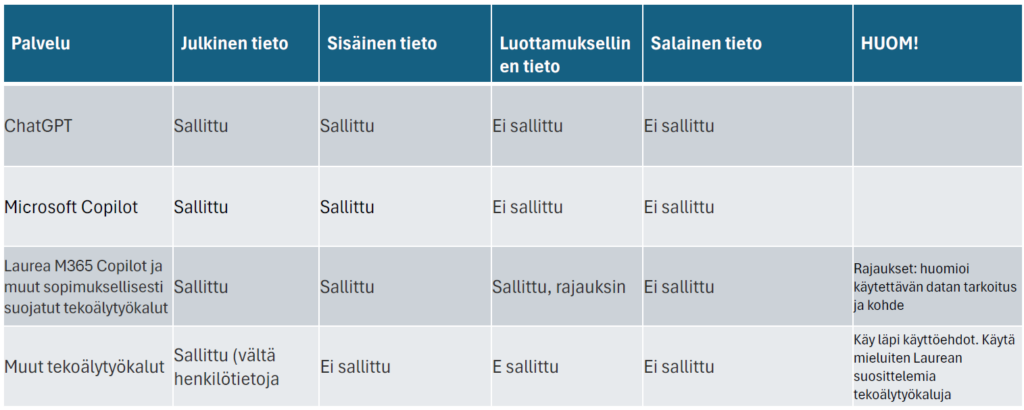
Processing data with AI tools
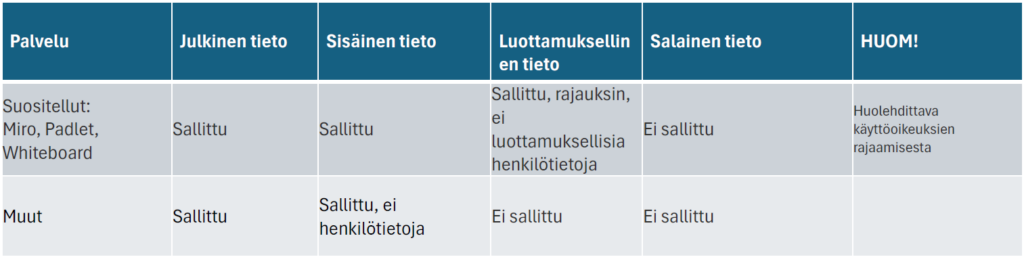
Sharing and processing data with co-development tools
File sharing
Please share files according to Laurea’s data classification guidelines.
OneDrive
OneDrive for Business is the place where you can store and share your files. You can update and share files from anywhere and use Office documents with other users at the same time. OneDrive for Business is a Laurea-supported and recommended tool, which you can find in the Office 365 suite from the link in the top left corner.
FileSender – an easy way to send large files
FileSender is a service that allows you to send really large files (even several gigabytes) without filling the recipient’s email. You log in to the service with HAKA authentication, meaning as a Laurea student you use your Laurea credentials directly – no separate accounts.
When should you use FileSender?
Use FileSender when the file is too large to send by email, for example:
- videos
- audio files
- thesis with many images
- other large files or files requiring special software
How does FileSender work?
- You upload the file to FileSender (to the FUNET server).
- You add the recipients’ email addresses.
- The service sends them a notification containing a link to download the file.
- You select an expiry date for the file, after which it is automatically removed from the service.
Remember!
- It is advisable to keep a backup elsewhere of files stored in FileSender so that important material is not lost if the service is temporarily unavailable.
You can log in to FileSender at https://filesender.funet.fi/
Guide video and short introduction at https://www.csc.fi/funet-filesender-tiedostonjakopalvelu
Google – what students should know
Google Docs is Google’s free office application that lets you create text, spreadsheet and presentation files directly in the browser. The service requires a Google account, and documents can be accessed from any device with internet and a browser.
You can:
- create new files or upload your own documents to the service
- share files with others and work on them together
- edit the same document with multiple people at the same time
- chat in real time with other authors
- take advantage of automatic saving, which ensures work is not lost
Remember to also save important files to your own computer as a backup.

Security note!
Google’s terms of service grant Google broad rights to stored content. Therefore Google Docs is not recommended for handling personal data or confidential information.
You can read the terms of use at http://www.google.com/accounts/TOS
Learn about Google Docs at https://docs.google.com/
Laurea does not support the use of Google tools.
Photography and publishing images
Remember that photographing and publishing images are two different things. You generally cannot share or publish photos or videos you have taken on social media, websites, publications or video platforms without the consent of the person photographed.
Photography and social media posts
Photographing in public places is usually allowed. You can share, for example, event photos on social media. If you photograph an individual person, always ask permission before publishing.
At events it is good to consider those who do not want to be photographed. This can be communicated, for example, with signs or at the beginning of the event.
Use of recordings in communications, marketing or projects
If images or videos are used in communications, marketing or project work, those photographed must always be informed:
- for what purpose the images will be used
- that consent is voluntary
If necessary, you can use Laurea’s media agreement template. Refusal must not cause any disadvantage.
Security and storage
Check where the photos on your phone are stored and backed up (e.g., Google Photos, iCloud). Ensure you only publish or share images securely and delete unnecessary images if needed.
Copyright
If you publish photos taken by others, ensure copyrights:
- ask permission when necessary
- credit the photographer
Photography in teaching
In learning tasks, photographing can be pedagogically justified.
In that case images are used only internally, and separate consent is usually not required – but those photographed should always be informed that photographing is taking place.
Quick photography guide for students
- Photographing in public places is okay, but ask permission if you photograph an individual.
- At events, consider those who do not want to be in photos.
- If images are used in communications, marketing or projects, inform those photographed of the purpose and ask for consent.
- Check where photos are stored (e.g., Google Photos / iCloud) and delete unnecessary images if needed.
- Do not publish others’ photos without permission and remember to credit the photographer.
- Photographing for learning tasks is fine, but always inform participants that photographing is taking place.
What is personal data?
Understand when you process personal data
Personal data are all information by which a person can be identified either directly or by combining different pieces of information. Direct identifiers include, for example, a name or national identification number. Indirect information, such as age, municipality of residence or job title, can also reveal a person’s identity when combined.
If you work in a project, research or development task and a person can be identified at some stage, you are processing personal data. In that case you must comply with the EU General Data Protection Regulation and handle the data carefully and responsibly.
Protect special categories of personal data
Under the EU General Data Protection Regulation, special (sensitive) categories of personal data are data whose processing may cause harm to a person. Therefore, their processing is generally prohibited, and they must not be collected for example for a thesis without special justification.
Special categories of personal data include:
- race or ethnic origin
- political opinions
- religious or philosophical beliefs
- trade union membership
- genetic and biometric identification data
- health-related data
- sexual orientation and behaviour
When may students process them?
Special categories of personal data may be used only in exceptional situations, for example:
- with the person’s clear, explicit consent, or
- in research in the public interest where the processing is necessary.
How to act if you process sensitive data?
If your research or project requires processing sensitive personal data, they must be protected particularly carefully. In practice this means:
- The processing of the data must be auditable afterwards
(who has stored, modified or transferred the data) - Persons processing the data must have sufficient competence
- There must be a data protection officer available for advice if needed
- Agreements on practices to prevent external access to the data must be made between the controller and any processors
- Data must be encrypted and pseudonymised if necessary so that individuals cannot be easily identified
- Systems must be secure and reliable (confidentiality, integrity, availability, fault tolerance)
- Security measures must be assessed and tested regularly
Before you start processing sensitive data, you must also assess and document whether the processing is truly necessary and what risks are involved – and how the risks can be minimised.
Anonymisation and pseudonymisation
Anonymisation means processing personal data so that no one can be identified anymore.
– This may mean coarsening the data or converting it into statistical form.
– Simply removing a name or national identification number is not enough if a person can still be identified by combining other information.
– If you intend to share a dataset, it must be anonymised.
Pseudonymisation means replacing personal identifiers with, for example, codes or pseudonyms.
– A person can still be identified if a separate code key exists that links the data back to the individual.
– Therefore pseudonymised data are still personal data.