What should I do if I do not want to or cannot take a Proctorio-proctored exam at home?
Reserve a space on campus.
What should I do if I do not want to or cannot take a Proctorio-proctored exam on my own computer?
You can reserve a loaner computer from the campus and book a space to take the exam. The computer must be reserved in advance from the Front Desk; there are only 2-3 loaner computers available, so make your reservation early. The computer may be borrowed only for the duration of the exam. Arrive to collect the computer in good time so you have time to install the Proctorio extension required for the exam. Send an email about the computer reservation to your campus Front Desk, e.g. isannat.leppavaara@laurea.fi
Computers are not available for loan at the Porvoo campus.
How can my identity be verified?
If the teacher does not recognize students by appearance, you may be asked to present an identity document at the start of the exam. Accepted documents include (check with the student affairs office which ones are valid!). You may cover the end part of your personal identity number on the identity document.
Why does the exam ask for an access code?
If a Proctorio-proctored Canvas exam requires an access code, your browser does not have the Proctorio extension installed or it is not enabled. Check the instructions to ensure the extension is installed.
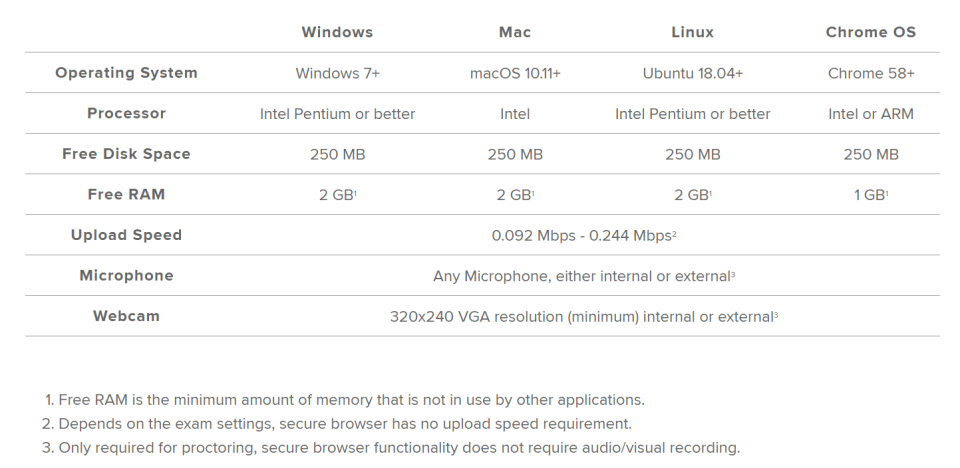
Computer requirements for Proctorio to work:
You can find Proctorio’s updated requirements on Proctorio’s own website